Business Decision Tool
Decision support for agency owners
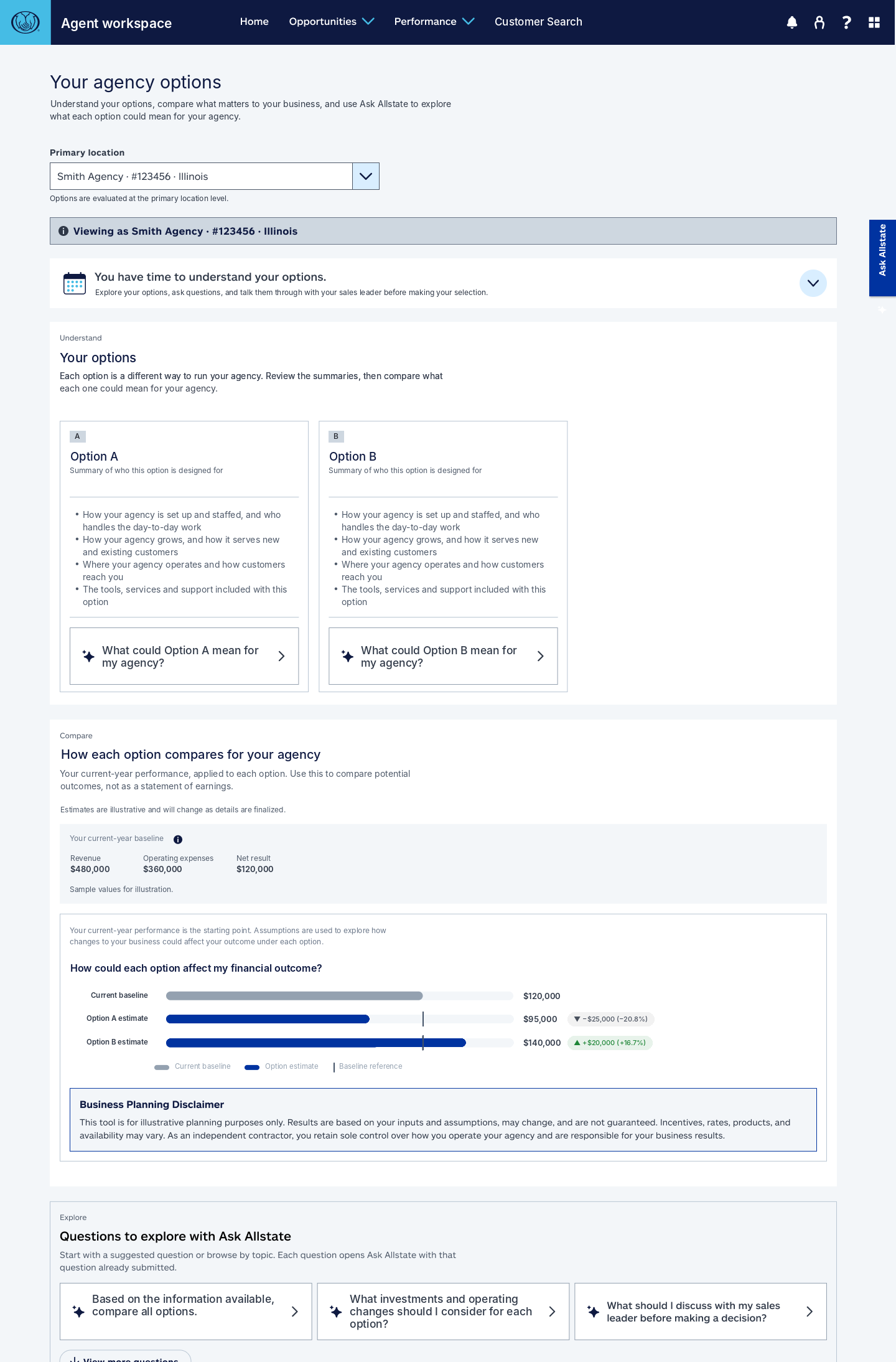
Allstate planned to guide agency owners through a major business decision in chat. I brought the team together around a different approach. I designed a dedicated page where owners can compare financial projections against their own agency's baseline and open Ask Allstate for deeper questions.
Deciding where AI belongs before the product existed
All three changes moved into development. Engineering has demoed the destination and its first section. Business partners aligned on the access model.
The original requirements put the decision and its financial projections in chat. I mapped the wider journey and built alignment around a dedicated destination, including with a senior product leader who initially disagreed.
- Give the decision a home where owners can return as they weigh their options.
- Put the numbers on the page so owners can compare estimates against their own baseline.
- Make the assistant findable with prompts that carry the owner's question into chat.
Shaping the experience before the requirements were set
I designed the experience, working with a product lead who owned scope and alignment. My part:
Partners: product, engineering, user researchers, conversational designers, finance, legal and business partners. The user researchers ran the qualitative study described under The Problem.
Screens and details have been adapted or generalized to protect internal product information.
A foundational decision, planned as a chat
Allstate's exclusive agents run their own agencies: they hire staff, invest in marketing and build their business over years. Every owner would need to make a foundational choice about how their agency operates, within a set window.
Agents weren't choosing a theoretical model. They were choosing a future for their own business. So the real question wasn't "How are the models different?" It was "What would each model mean for my agency, based on my own performance?" I shared a concept built on that agency-specific comparison within the first week. Later qualitative research reinforced it: agents wanted to start from their real performance, see the full economics, and compare against a common baseline.
Answering that question well takes a fixed baseline, exact numbers, a way to compare models side by side, and room for follow-up questions. The plan in front of the team put all of it in a chat.
Give the decision a home
The plan I was given. Leadership wanted an AI answer to the decision. Ask Allstate, Allstate's AI assistant, would help agents understand the models, run what-if scenarios and eventually select one, and a proof of concept had already been demoed. The requirements described the chat, but not the journey around it. They didn't say how agents would hear about the decision, where they would go, how they'd discover the assistant, or where they would finally commit.
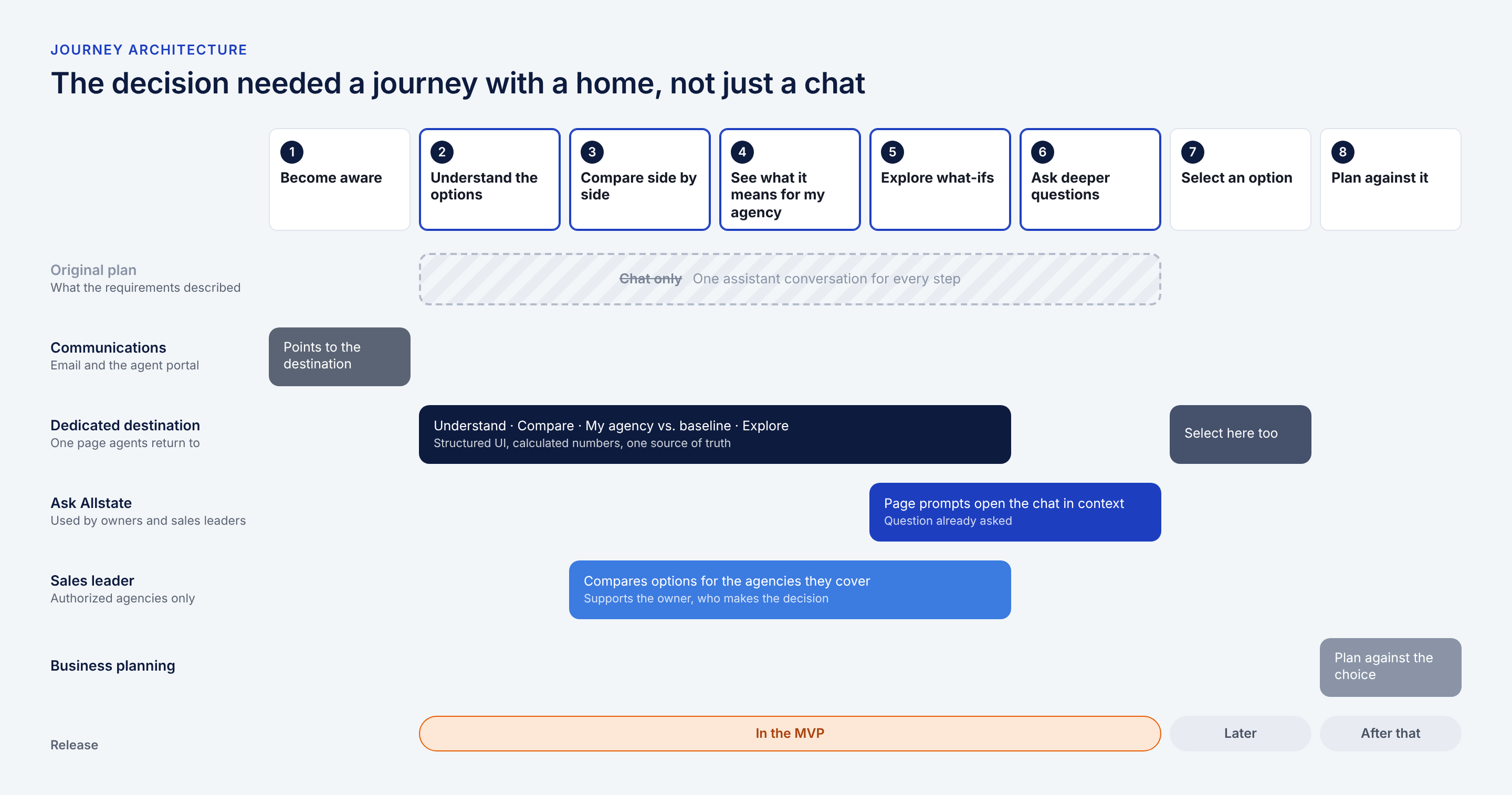
What I proposed. In the first pre-inception session, I showed a flow that started outside the chat: "We're going to have to think of where are all the different avenues." Agents arrived from the agent portal or email and landed on a dedicated page, where they could learn the models and open the chat from contextual entry points. I mapped the full journey for the team: become aware, understand, compare, see what it means for my agency, explore, ask deeper questions, select, plan.
The pushback. A senior product leader asked why the information couldn't live in the agent portal: "I don't see a need for something in between." Two weeks later, a UX partner for the agent workspace asked why the page wasn't just a portal article, and pointed out there was no room in the header.
How I responded. I made the case to both of them. Email and the portal are communication channels, not places built for side-by-side comparison or weighing trade-offs. Agents would come back to this decision over months: learn first, compare later, decide when the window closed. The portal is "a way into the experience, rather than the experience itself." Then I offered to bend on everything except the idea: "Names are very flexible. Just establishing the pattern."
What changed. The UX partner replied, "okay that makes sense," and moved straight to how to build it. Leadership aligned on a dedicated navigation item the same day. From inception on, delivery leads planned the build around my mockup, and the senior product leader later supported taking the experience to the heads of sales.
Put the numbers on the page
The plan I was given. The original requirements called for agents to ask the assistant for their agency’s projections and get the numbers back in chat. I saw a place for chat in follow-up questions like “Why does this option come out differently for me?” My concern was how an owner would keep the estimates side by side as the conversation moved on.
Increase retention 5%.
Now new business 10%.
Actually, move retention back.
What was the second model before I changed that?
What I proposed. For seeing what each model means for my agency, conversation wasn't the easiest way. I proposed putting each model's projection on the page: the agency's current-year baseline locked as the reference, every model's estimate side by side against it, calculated deterministically, with an explanation of why each one differs. When product leaned toward letting the assistant handle that work, I wrote, "I think structured UI would offer more value here."
- The agency's baseline and side-by-side comparison
- Each model's projection for my agency
- How each number was calculated
- Explanation and interpretation
- Exploring a specific scenario further
- Follow-up questions
What changed. The projections moved out of the conversation and onto the page. I presented the design at formal inception, and engineering backed it with deterministic calculation services and, in their words, "a UI and a conversational AI piece on top." The first release shows each model's estimate side by side against the agency's own baseline.
Make the assistant findable
The gap I saw. The team was already building the assistant. How would agency owners know when it could help or what to ask? In the first session I asked, "How do you make it absolutely clear that there's a dedicated tool to answering your additional questions?"
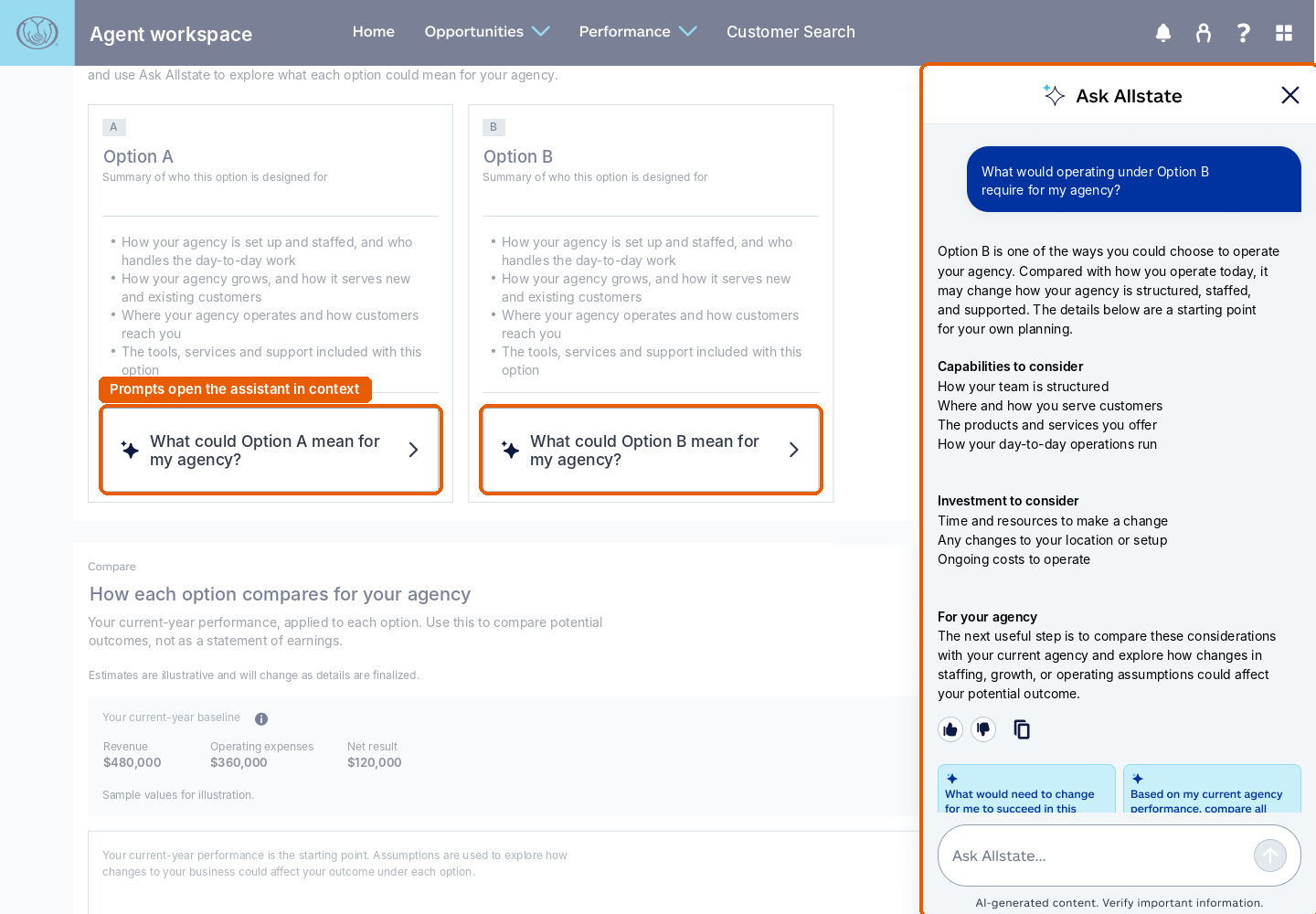
What I proposed. Don't make agents open a chat and invent a question. Building on a teammate's point about in-context help, I proposed pulling the assistant's prompts out of the chat and onto the page, next to the content they're about. Click one, and the chat opens with that question already asked. I believed contextual entry points would make the assistant easier to discover and use.
The pushback. A legal partner raised that prompts could imply how Allstate expected agents to run their businesses. I showed that the page was deliberately framed around "explore your possibilities" rather than recommendations, and argued that the same non-prescriptive guardrail had to hold inside the assistant, not just on the page. Legal agreed.
What changed. Within days, prompts and typing on the page to launch a chat were both working in my prototype. The MVP has prompts next to the content and an Explore section that opens Ask Allstate, and the engineering handoff includes components that open the assistant with the question loaded.
Trade-offs on the path to delivery
All three changes moved into development
It took under four weeks to go from first concepts to a direction engineering planned to build. The work is now in engineering delivery toward an MVP, and it hasn't launched. I designed the ideal journey first, then scoped the MVP out of it, so each release adds the next step in the same place instead of a new tool: first understand, compare and explore; later select a model in the same destination; after that, plan against it.
The early signals are about alignment and delivery, not user results:
What I'd take forward
I saw that the plan asked conversation to do work it isn't good at. I brought product, engineering, legal and design leaders around to a different direction, and I designed the experience engineering is now building. The principle underneath every call is the one I'd bring to any AI product:
Deterministic systems for accuracy, structured UI for visibility and control, and conversation for exploration and explanation.
Good AI design includes deciding where AI doesn't go.
Interested in working together?